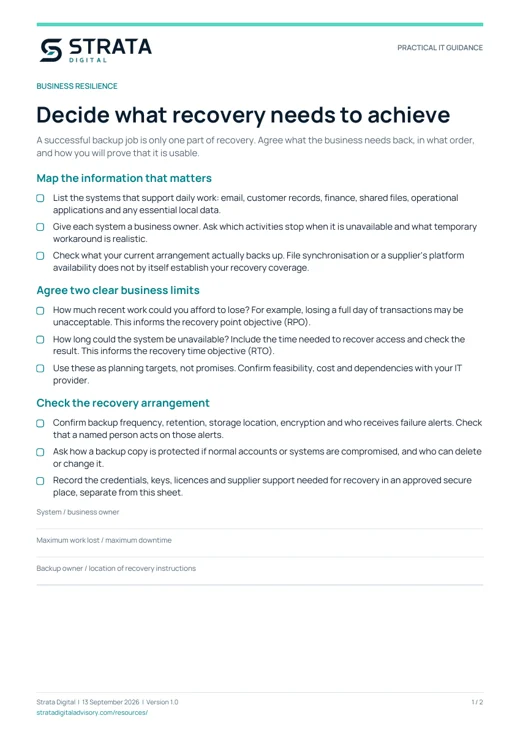
Decide what recovery needs to achieve
A successful backup job is only one part of recovery. Agree what the business needs back, in what order, and how you will prove that it is usable.
Map the information that matters
- List the systems that support daily work: email, customer records, finance, shared files, operational applications and any essential local data.
- Give each system a business owner. Ask which activities stop when it is unavailable and what temporary workaround is realistic.
- Check what your current arrangement actually backs up. File synchronisation or a supplier's platform availability does not by itself establish your recovery coverage.
Agree two clear business limits
- How much recent work could you afford to lose? For example, losing a full day of transactions may be unacceptable. This informs the recovery point objective (RPO).
- How long could the system be unavailable? Include the time needed to recover access and check the result. This informs the recovery time objective (RTO).
- Use these as planning targets, not promises. Confirm feasibility, cost and dependencies with your IT provider.
Check the recovery arrangement
- Confirm backup frequency, retention, storage location, encryption and who receives failure alerts. Check that a named person acts on those alerts.
- Ask how a backup copy is protected if normal accounts or systems are compromised, and who can delete or change it.
- Record the credentials, keys, licences and supplier support needed for recovery in an approved secure place, separate from this sheet.
What to record
- System / business owner
- Maximum work lost / maximum downtime
- Backup owner / location of recovery instructions
The PDF includes space for your notes.
Test a restore, then improve the plan
Choose a useful business scenario and a safe test environment. A restore should demonstrate that authorised people can use the recovered information.
Before the test
- Agree the scope, owner, timing and success criteria. Avoid overwriting live data, and confirm how the test will be stopped if there is an unexpected impact.
- Choose a recovery point and check the relevant backup is available. Include access, application and connectivity dependencies in the plan.
During and after the test
- Record start and finish times, the recovery point used, what was restored and any errors or missing dependencies.
- Ask the business owner to open a representative sample and confirm it is complete enough for the intended work.
- Compare the result with your agreed data-loss and downtime targets. Assign an owner and due date to each gap.
- Update the recovery instructions and schedule the next test according to business risk. Revisit the plan after major system or supplier changes.
What to record
- Test date / system / test owner
- Recovery point used / start and finish time
- Result confirmed by the business owner
- Gap / action / owner / due date
- Next planned test
The PDF includes space for your notes.